Your AI can run Solstral.
Connect Claude, ChatGPT or any app that speaks MCP, and it can work in your workspace with 273 tools: find and update records, build lists and campaigns, run reports, answer the inbox and more. Anything big shows you a preview first.
Works as you: your role, your records
Asked in Claude
“What's going on with Ann Lee at Northwind?”
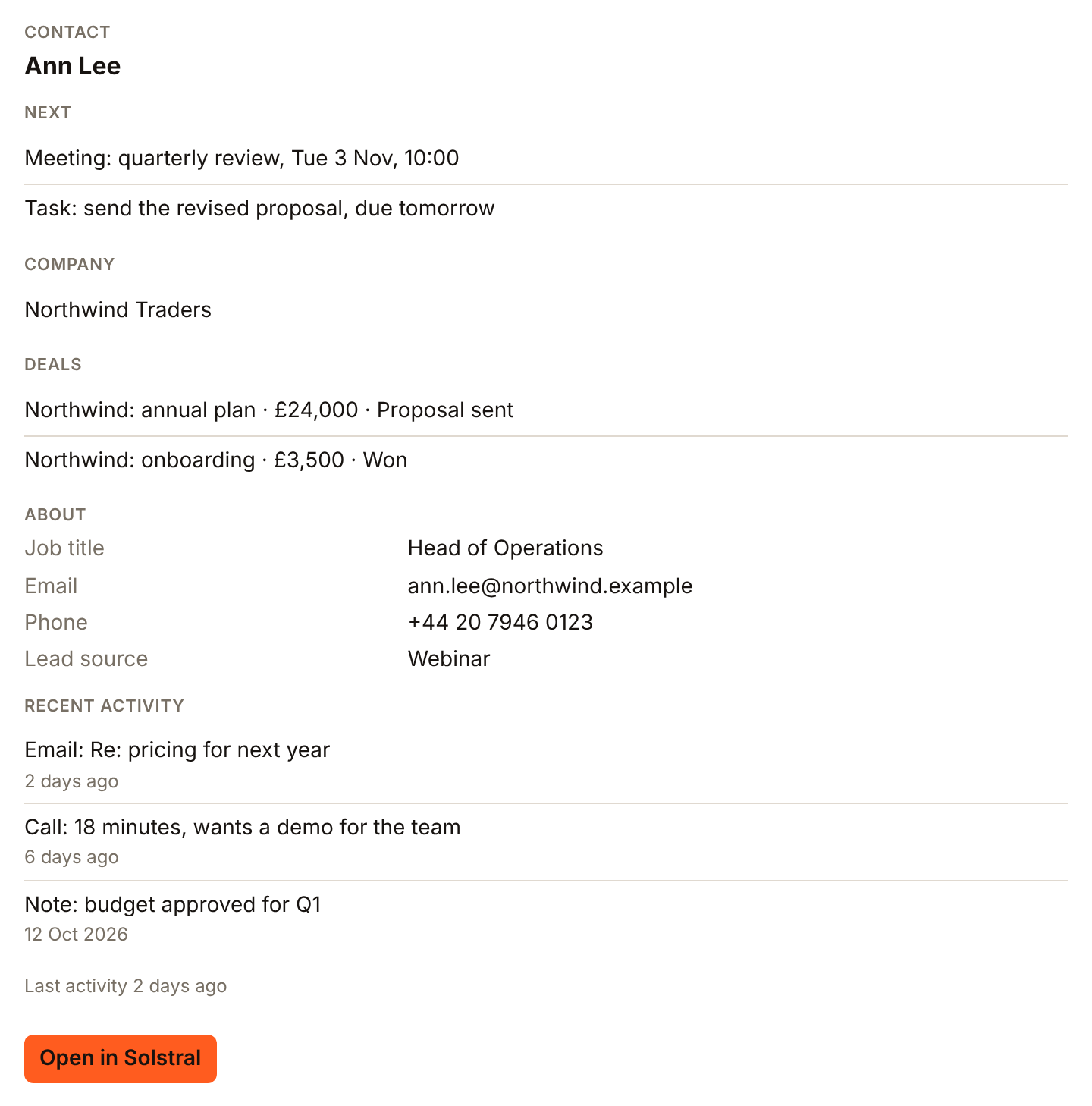
Ask, and it's done.
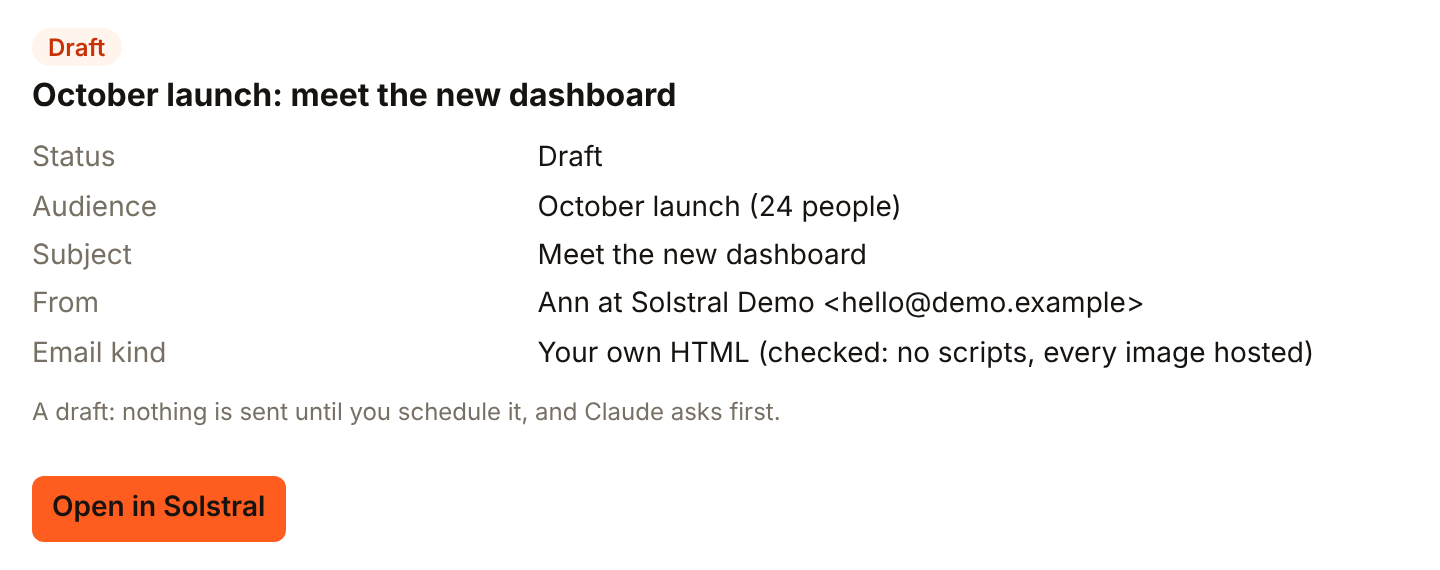
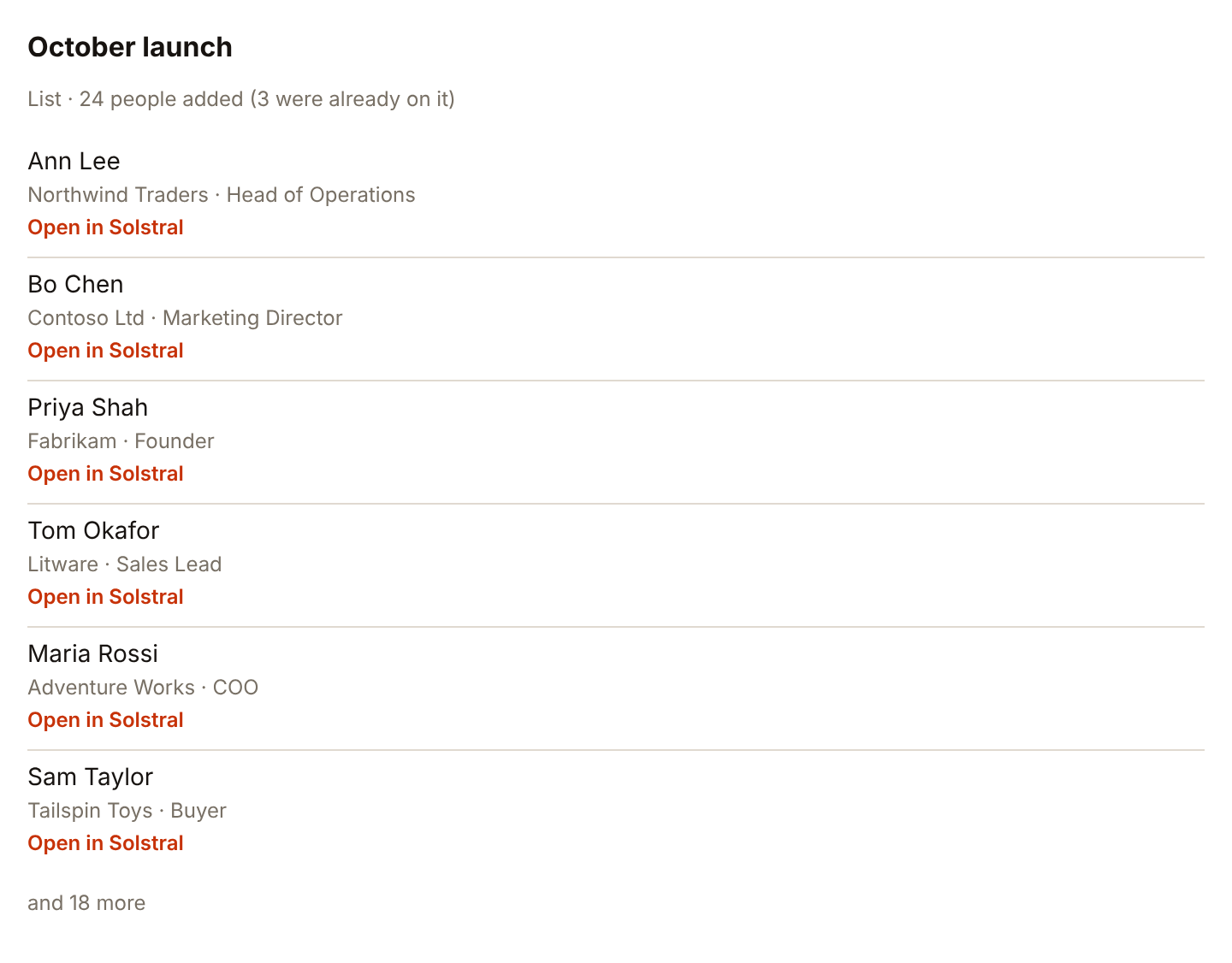
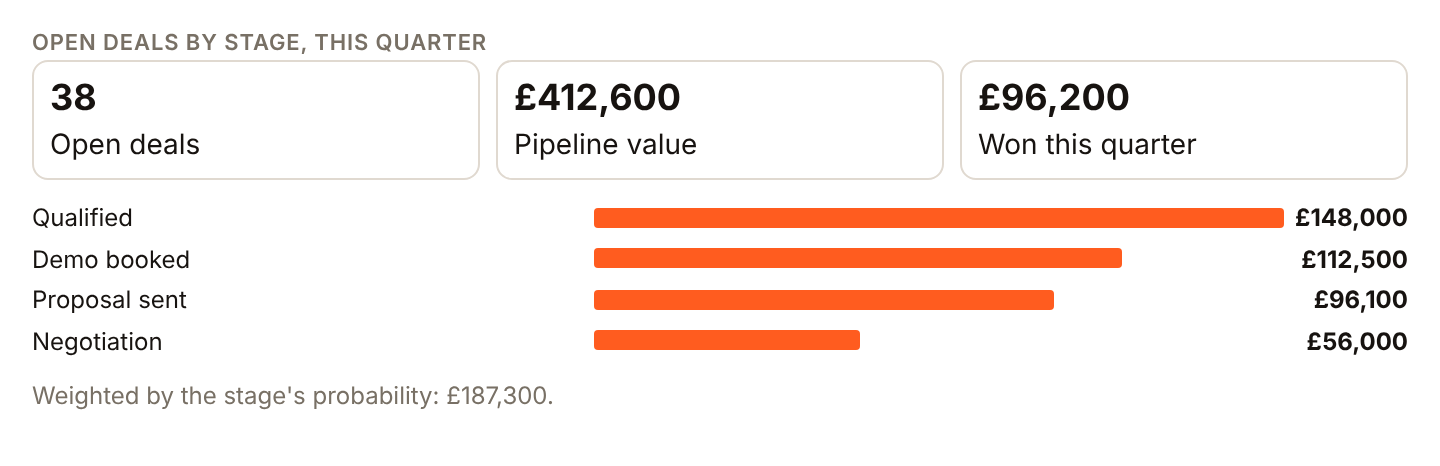
Real requests and the cards that came back, from Solstral's demo workspace in Claude. Each card links back into Solstral.
01 · Asked in Claude
“Make a campaign to the October launch list with this HTML email”
02 · Asked in Claude
“Make a list called October launch and add everyone who came to the September webinar”
03 · Asked in Claude
“Move the Northwind annual plan to Negotiation and set the close date to 30 November”

04 · Asked in Claude
“Show me open deals by stage this quarter”
What it can do, by area.
273 tools in all: 135 that look things up and 138 that change something. This list is generated from the same catalogue a connection reads, so it changes when the product does.
Contacts, companies and deals
4822 to look up · 26 to change
- Complete a task
- Log a note or task
- Delete an activity
- Edit a note or task
- Assign agendas to a chat bot
- Create a chat agenda
and 42 more
- List chat agendas
- Publish a chat agenda
- Test a chat agenda
- Explain an AI field's value
- Fill an AI field's column
- List a record's attachments
- Look up contact data
- Find people with Apollo
- What's happening on a deal
- Find duplicate records
- Forget cached website lookups
- Look up a company from its website
- What happened since
- What a record did
- Track an event
- Undo changes from the activity history
- File an upload on a record
- Files on a record
- Preview cleaned import data
- Inspect a CSV before importing
- Archive or restore a record
- Bulk archive/restore records
- Change every record in a selection
- Get a record with its context
- Create a record
- Find records by email address
- Get a record
- Link two records
- List records
- Merge records
- Query & shortlist records
- Search records
- Find the records to act on
- What's in the trash
- Undo a bulk change
- Unlink two records
- Update a record
- Explain a lead score
- Create a saved view
- Delete a saved view
- List saved views
- Change a saved view
Reports, forecasts and goals
2616 to look up · 10 to change
- Website traffic
- AI credits and plan usage
- Campaign performance report
- Create a dashboard
- List dashboards
- Change a dashboard
and 20 more
- Deliverability by domain
- Get the sales forecast
- Submit my forecast call
- Set a target
- List targets and progress
- Plan a program for a goal
- Turn a goal into a target
- List reporting sources
- Run a report
- List report templates
- Why did this change?
- Create a saved report
- List saved reports
- Change a saved report
- Transactional email stats
- Snooze or dismiss a suggestion
- Act on a suggestion
- What should I do next?
- The records behind a suggestion
- Not needed (one record)
Email campaigns and lists
3618 to look up · 18 to change
- Archive a draft campaign
- Pre-send checklist
- Create a campaign (draft)
- Edit campaign copy
- Get a campaign's HTML
- List campaigns
and 30 more
- List merge tags
- Read a campaign's copy
- Schedule a campaign
- Send a test of a campaign
- Set a campaign's email as HTML
- Change a campaign
- Consent history
- Would the contact policy hold an email to them?
- Contact policy
- DMARC reports and whether it's safe to enforce
- Contacts who have stopped engaging
- Where a campaign landed - inbox or spam
- What Gmail thinks of a sending domain
- Register a domain
- Check a domain's DNS
- List email domains
- Check sending (DKIM) for a domain
- Turn on email sending for a domain
- Why isn't my email reaching them?
- Stop emailing an address
- Is this email address verified?
- Ask someone to verify their email
- Add contacts to a list
- Create an audience
- Delete a list
- List audiences
- Who's on a list
- Remove contacts from a list
- Is it too early to contact them?
- Send a transactional email
Email and the inbox
2410 to look up · 14 to change
- Add what capture found
- Dismiss what capture found
- What capture found
- Scan a mailbox for people
- Undo a capture batch
- Draft an email
and 18 more
- Why can't I send email?
- Draft a reply to an email
- Write or change the email draft
- Log an email on a record
- Schedule an email for later
- Cancel a scheduled email
- List scheduled emails
- Send an email
- List the addresses I can send from
- Change many conversations at once
- Read a conversation
- List inbox conversations
- Add an internal note
- Reply to a conversation
- Change a conversation
- List mailboxes
- Read the email signatures
- Set an email signature
Forms and booking pages
199 to look up · 10 to change
- Check a form works end to end
- Build a form
- List forms
- Publish or unpublish a form
- Read form submissions
- Rename or rebuild a form
and 13 more
- Advanced availability
- Check availability
- Book a meeting
- Brief me on a meeting
- Cancel a meeting
- Duplicate a booking page
- List meetings
- Notes from recorded meetings
- List booking pages
- Reschedule a meeting
- Send a booking link
- Create a single-use link
- Meeting analytics
Websites
166 to look up · 10 to change
- Add a blog to a website
- Write a blog post
- Rename a class on a website
- List a website's classes
- Let a website show a collection
- Import an existing website into a site
and 10 more
- How a website import is going
- List websites and pages
- Make a website page from ready-made sections
- Change a piece of page copy
- Read a page's copy and SEO
- Publish a website
- Audit a site's SEO
- Set a page's SEO
- Draft SEO for a page
- Set a website variable
Flows and automation
158 to look up · 7 to change
- Activate or pause an automation
- Build an automation (draft)
- Get an automation
- List automations
- Did my automation run?
- Update an automation draft
and 9 more
- Read a webhook flow's test data
- Generate a conversation flow
- Why did this happen?
- Rehearse before going live
- Enrol people in a sequence
- List sequences
- Create a webhook endpoint
- Delete a webhook endpoint
- List webhook endpoints
Support and the chatbot
198 to look up · 11 to change
- Create or update a chat bot
- List a widget's leads
- Accept or undo a conversation's changes
- Add a curated FAQ
- Suggest FAQs from past chats
- Add a knowledge article
and 13 more
- Sync a Notion database into the knowledge base
- Ingest a website into the knowledge base
- Search the knowledge base
- Report a bug or request a feature
- Assign a ticket
- Raise a ticket
- Get one ticket
- List support tickets
- Add an internal note to a ticket
- Reply to the requester on a ticket
- Ticket SLA targets
- Helpdesk numbers
- Change a ticket
Templates and media
147 to look up · 7 to change
- Search the media library
- Add an image or document from a web address
- Make a link to upload files from a computer
- Check an upload link
- List saved email sections
- Read a saved email section
and 8 more
- Save a reply as a snippet
- List saved replies
- Change a saved reply
- Create an email template
- Edit template copy
- List email templates
- Read a template's copy
- Change a template's settings
Social posts and text messages
179 to look up · 8 to change
- Draft a text campaign
- List text campaigns
- Send or schedule a text campaign
- Send a text
- Read a record's texts
- List social accounts
and 11 more
- Create a social post
- Draft social post copy
- Schedule or publish a social post
- List social posts
- List posting queues
- Approve or discard an AI reply
- List AI replies awaiting approval
- Draft a comment automation
- List comment automations
- Pause or resume a comment automation
- List engage targets
Workspace setup and members
2916 to look up · 13 to change
- Describe an action
- Find an action
- Search the audit trail
- Daily export status
- Describe the app
- List capabilities
and 23 more
- Describe an object
- Describe events
- Find a setting
- Generate a workspace
- Add or remove someone from a team
- Create a team
- List teams
- Set what a team can access
- Check connected accounts
- Invite someone to the workspace
- List workspace members
- Remove someone from the workspace
- Change someone's role or access
- Check on long work
- Read my profile
- Update my profile
- Add a field to an object
- Create a custom object
- Rename a field or change its options
- What's in the sidebar
- Show or hide a module in the sidebar
- Read workspace settings
- Change workspace settings
Approvals, notifications, memory and skills
106 to look up · 4 to change
- Approve or turn down a change
- List change requests
- Ask the user
- Forget something
- List remembered facts
- Remember something
and 4 more
- What have I missed?
- List saved skills
- Save a skill
- Run a saved skill
Safe by design.
An AI connected to Solstral works as a person on your team: with their role, and only the records they can see. Then these rules apply on top.
51 tools answer with a preview and wait for a confirmation.
- 01
A preview before anything big
Sending, deleting, bulk changes and changes to fields or settings come back as a preview first. Nothing happens until you confirm, and a confirmation works once, within ten minutes.
- 02
Admins approve setup changes
When a member's AI asks to change how the workspace is set up, the exact request goes to your admins as a task with Approve and Reject. It runs unchanged, and only once one of them approves.
- 03
Undo
A bulk change can be undone for 30 days, and deleted records wait in the trash to be put back. A value someone edited since is left alone, and you're told how many were skipped.
- 04
Permissions per connection
Sending email, deleting, bulk changes and setup changes stay off until you tick them when you connect. An admin can make any connection read-only, cap its calls per day, or disconnect it.
- 05
One contact policy for people and agents
Campaigns, flows and AI agents all check the same contact policy before they email someone. Over your limit, an email waits instead of going out, and anyone who unsubscribed is never emailed.
Connect in three steps.
One connection is one person in one workspace. Claude and ChatGPT sign in with OAuth, so there is no key to copy.
https://app.solstral.com/api/mcp
- 01
An admin turns it on
In Solstral, an admin opens Settings > AI connections and switches on Allow external AI services to connect. It is off on every new workspace.
- 02
Add Solstral as a connector
Copy the MCP address from the same screen. In Claude, add it as a custom connector under Customize > Connectors. In ChatGPT, turn on Developer mode under Settings > Apps and create an app with the address. Claude Code, Cursor and n8n take the address with an API key.
- 03
Sign in and choose what it may do
Sign in to Solstral, pick the workspace, and tick anything extra you want to allow: sending email, managing automations, or deleting, bulk changes and changes to fields and settings. Each stays off until you tick it.
Frequently asked questions
Claude, ChatGPT and any app that speaks MCP, the open standard for connecting AI apps to other software. Solstral also has its own assistant inside the app, with the same tools and the same rules.
Anything the person who connected it can't do: it has their role and sees only the records they can see. It can't reach another workspace, and sending, deleting, bulk changes and setup changes stay off until that person allows them.
Each paid plan includes a daily number of connector actions. Listing tools or reading the workspace's shape never counts; only actions do. The pricing page has the numbers.
What the AI reads or writes is sent to that AI service under your own account with it, not Solstral's. Your Solstral data stays hosted in Sydney.
Start free, then connect your AI.
Every plan includes the whole platform. Connect Claude or ChatGPT once your workspace is set up.